
Before sending out requests, initial configurations are required to align the Borrower Needs feature with a company's specific operational workflow. This article details the administrative setup, demonstrating how users can modify out-of-the-box, system-delivered Borrower Needs or create their own custom requirements. Additionally, it covers how these needs can be configured to fire automatically on a loan based on specific loan characteristics or individual borrower profiles, ensuring a highly automated request process.
Borrower Needs Configuration
The Borrower Needs configuration is completed by navigating to Settings > Borrower Needs > Borrower Needs.
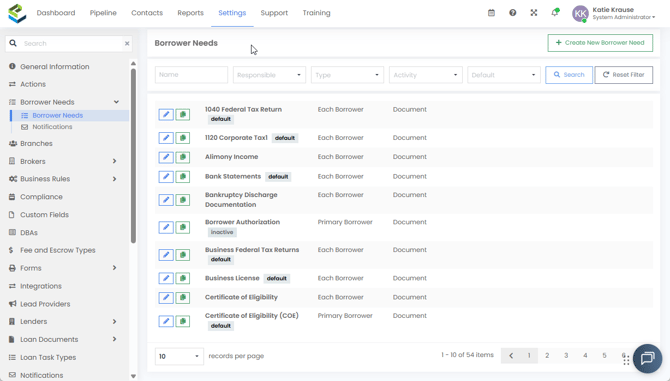
Within this screen, administrators will see all the configured Borrower Needs and can search or filter by Borrower Needs Name, Responsible party, Type, Activity, or Default flag.
Additionally, administrators can create new Borrower Needs or edit existing ones:
- Default/Inactive Flags: Borrower Needs will display a “default” flag if they are configured to default on loans automatically (either on all loans or based on specific loan/borrower conditions). When an administrator inactivates a Borrower Need, it will display an “inactive” flag.
- Editing & Copying: Administrators can edit a need by selecting the edit icon or copy an existing need to a new one using the copy icon.
Creating a New Borrower Need
By selecting the Create New Borrower Need button, the administrator will be prompted to complete required information for the new need.
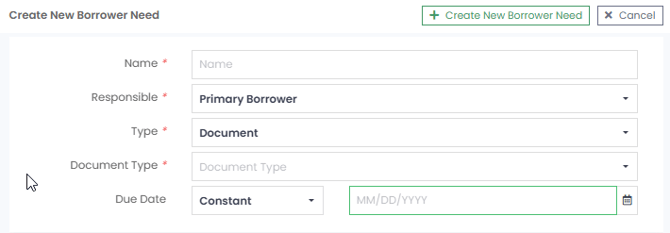
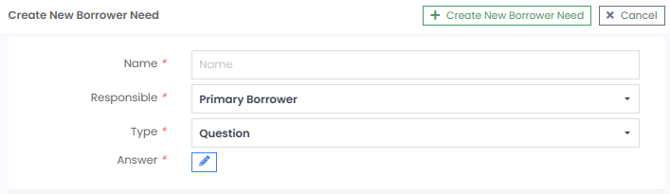
- Name: The name of the need that will display to the borrower as the required information in the Point of Sale (POS).
- Responsible: The responsible party, which can be set to either Primary Borrower or All Borrowers. Needs set to Primary Borrower will only appear in the first borrower’s POS portal; needs set to All Borrowers will display for all borrowers on the transaction. Tip: Administrators should determine if that type of document or question is individual to each borrower or applies at a transaction level before assigning this field.
- Type: The type of borrower need, either a Document or Question for the applicant(s) to complete.
- Document Type: (Applicable to Document Borrower Needs only) The Document Manager Document Type that should be assigned to documents received by the borrower for this need.
- Due Date: (Applicable to Document Borrower Needs only) The due date for the borrower to respond. This can be configured as Constant (static date), Field (populated by a date field within the loan), or Formula (populated by a calculated number of days from a date field within the loan).
- Answer: (Applicable to Question Borrower Needs only) Answer configurations are set with an applicable Parameter Type, Field Type, and Formatting Type. Additional configurations may be available based on the parameters selected.
Note: The Borrower Need Type (Document or Question) cannot be edited once the need is created.
Managing Existing Borrower Needs
When editing in the Manage Borrower Need screen, administrators can update the attributes and rules for the Borrower Need. In addition to the fields available during creation, users can modify the following advanced settings.
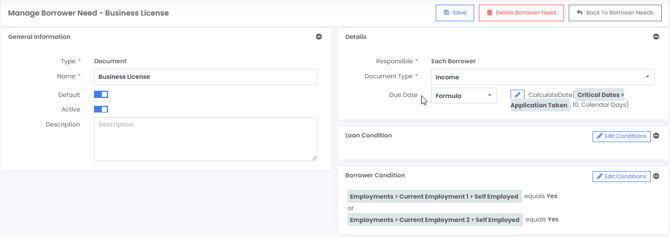
- Default: When this toggle is set to Yes, the system will automatically default the Borrower Need on all loans, unless there are limiting conditions set in Loan Conditions or Borrower Conditions.
- Active: When this toggle is set to Yes, the Borrower Need is active and available to be defaulted or manually selected on the loan.
- Description: Detailed Description of the Borrower Need. This is only visible within the LOS and POS.
- Loan Condition: The limiting condition to trigger a default to occur when the loan has a specific characteristic (e.g., Loan Type is VA). The Default toggle must be set to Yes for Loan Condition settings to apply.
- Borrower Condition: The limiting condition to trigger a default to occur when a borrower has a specific characteristic (e.g., Borrower is Self Employed). The Default toggle must be set to Yes for a Borrower Condition setting to apply.
Notifications Configuration
To configure the frequency of reminder notifications to the borrower, navigate to Settings > Borrower Needs > Notifications and select the Manage Borrower Need Notifications button.
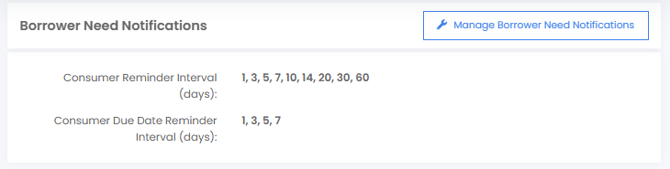
- Consumer Reminder Interval (days): Determines the number of days after an outstanding need has been pending on a file before sending a reminder to the borrower. These reminders only occur on active loans.
- Consumer Due Date Reminder Interval (days): Determines the number of days prior to a Borrower Need's due date to send a reminder to the borrower of the approaching deadline.