
Selecting Documents
Documents can be selected from the Documents section of a loan file, where each document displays a checkbox to its left.
- Individual documents can be selected using the checkbox next to each file.
- Check All / Uncheck All buttons are available at the Document Type level (to select all documents within a specific category) or globally across all documents in the loan.
When one or more documents are selected, a Bulk Document Operations button will dynamically appear at the top of the document list.
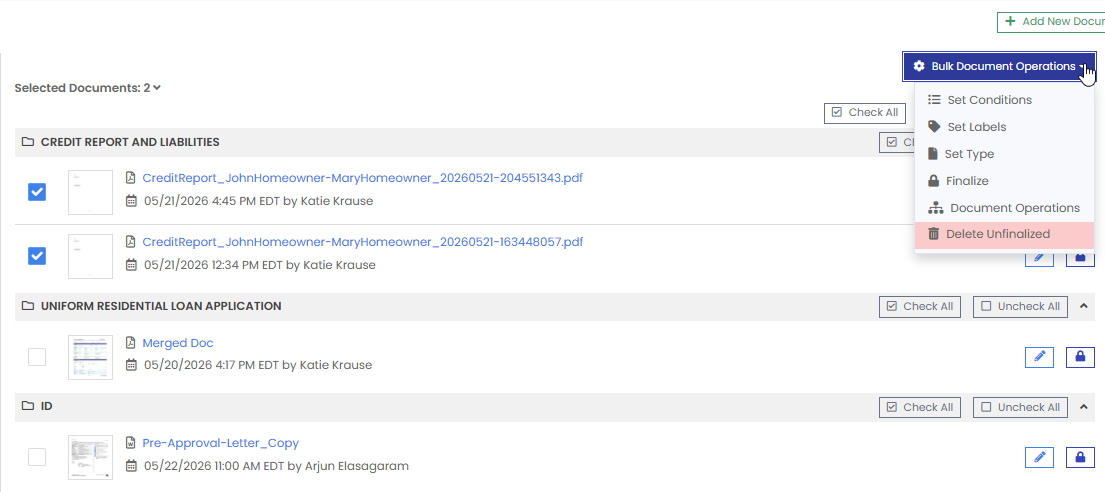
Available Bulk Actions
The Bulk Document Operations button opens a menu with the following batch actions:
| Action | Description |
|---|---|
| Set Conditions | Apply specific underwriting or loan conditions to all selected documents at once. |
| Set Labels | Assign or update document labels across the selected files in a single step. |
| Set Type | Reclassify the Document Type for multiple selected files simultaneously. |
| Finalize | Mark all selected documents as final at the same time. |
| Document Operations | Opens the Document Operations sub-screen for more complex batch processing, including the ability to Merge, Download, Send, or Archive the selected documents. |
| Delete Unfinalized | Bulk deletes all selected documents that have not yet been finalized. As a safeguard, any finalized documents within the selection will not be deleted. |
Important Notes
- Finalized documents are protected from bulk deletion. When using the Delete Unfinalized action, only documents that have not been finalized will be removed. Finalized documents in the selection will be skipped automatically.
- Permissions are enforced. All standard user role permissions remain in effect. If a user does not have permission to edit, delete, or finalize a document individually, those restrictions apply equally within Bulk Document Operations.