
Renovation:
Purchase
1. In the Overview tab > Terms and Mortgage section please choose Purchase.
2. Enter the Appraised Value as the "as-completed" value.
3. Enter the Purchase Price for the property being purchased.
4. In the Overview Tab > Details of Transaction section > Alterations enter only the construction costs/alterations amount. By entering the alterations field AUS will automatically run for Fannie Mae Homestyle, on conventional loans through DU.
5. Once these items are set please enter the down payment percentage requirement, if applicable, in the corresponding field in the terms and mortgage section, or enter desired loan amount.
Refinance
1. In the Overview tab > Terms and Mortgage section please choose No-Cash Out Refinance.
2. The appraised value should be the "as-completed" value.
3. In the Overview> Details of the transaction > Alterations enter the renovation costs here.
4. Set the loan amount to include existing liens and renovation costs.
5. Ensure the property is in the Loan Application tab > REO tab and marked as a subject toggle and if primary residence the current toggle is on.
6. In the Loan Application tab > Liabilities section ensure the existing lien is associated with the property and marked payoff (manually enter existing lien if needed). This will carry over to the Details of transactions in the refinance field.
Freddie: For renovation loans please go to the Additional section > Underwriting> Make sure AUS type is LPA > Program types drop-down > choose Home CHOICE. Freddie CHOICERenovation
Construction/Construction to Permanent :
Purchase (borrower does not own land): Land and Construction Costs are on the Same Contract
1. In the Overview tab > Terms and Mortgage section please choose Construction to Permanent.
2. Enter the Appraised Value as the "as-completed" value.
3. Enter the construction costs and the cost to purchase the land, combined, in the Purchase Price Field.
4. Once complete please enter the down payment percentage, if applicable, in the corresponding field in the terms and mortgage section.
5. Finally, in the additional tab > construction section the construction loan purpose should be purchase.
6. Complete additional applicable fields in the Construction section.
Purchase (borrower does not own land): Land and Construction Costs are on the Separate Contract
1. In the Overview tab > Terms and Mortgage section please choose Construction to Permanent.
2. Enter the Appraised Value as the "as-completed" value.
3. Enter the construction costs in the Purchase Price Field.
4. Enter the cost to purchase the land in C. Land on the Details of Transaction.
5. Once complete please enter the down payment percentage, if applicable, in the corresponding field in the terms and mortgage section.
6. Finally, in the additional tab > construction section the construction loan purpose should be purchase.
7. Complete additional applicable fields in the Construction section.
Refinance (borrower already owns the land)
1. In the Overview tab > Terms and Mortgage section please choose Construction to Permanent.
2. The appraised value should be the "as-completed" value.
3. In the Details of the transaction > Alterations enter the renovation costs or cost to build in the Alterations field.
4. Set the loan amount to include the existing construction lien (if any and applicable) and any alterations if applicable. Otherwise set the loan amount to the desired amount.
5. In the additional section > Construction section > Set Construction Loan Purpose type to Refinance.
If there is an existing lien to payoff please follow steps 6 and 7 below.
6. Ensure the property is in the Loan Application tab > REO tab and marked as a subject toggle and if primary residence the current toggle is on.
7. In the Loan Application tab > Liabilities section ensure the existing lien is associated with the property and marked payoff (manually enter existing lien if needed). This will carry over to the Details of transactions in the refinance field.
8. If you want to use the land as equity please follow the steps above and set the down payment to zero.
Note: DU/LPA does not fully support calculation of the Acquisition Cost for FHA loans, but the appropriate LTV cost on a refinance construction loan is the lesser of the Acquistion Cost (Land+Construction Costs) vs. After Improved Value. HUD indicated that the Land+Construction Amount could be entered in the Refinance amount in the DOT and then DU/Total Scorecard would be able to calculate the LTV as the lesser of.
WHETHER THEY OWN THE LAND OR NOT FOLLOW THE BELOW
***In the Additional data > Underwriting section > Refinance Purpose type > Cash Out Limited***
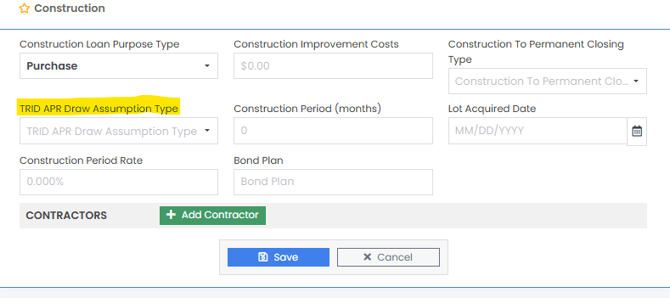
It is important to set the Draw Assumption Type in the Additional Data > Construction section. This will tell the system to calculate the correct P&I and APR based on your choice.
Currently only the below fields pass to the doc vendors:
- ConstructionToPermanentClosingType
- ConstructionRate
- ConstructionTermMonths
- ConstructionCostAmount
One Time Close